
Chatwoot for Ministry Teams
One Place for All Your Online Conversations
Connect with seekers on Facebook, Instagram, WhatsApp, and your website from a single dashboard. When they’re ready for follow-up, send them to Disciple.Tools with one click.
This is a beta project. We’re exploring Chatwoot as the solution we recommend for your online conversations. The integration is working and improving. We’re looking for ministry teams willing to try it and give feedback.
Join the Conversation on Discord
The Problem
Managing online outreach across multiple platforms is overwhelming:
- Scattered conversations — Jumping between Facebook, Instagram, WhatsApp, and email. Messages slip through the cracks.
- Manual data entry — Copying names, phone numbers, and conversation history into D.T by hand.
- No context on handoff — Field workers don’t know what was discussed online.
- Technical barriers — Facebook integrations require developer apps and API credentials.
What We’re Building
We’ve chosen Chatwoot because it’s open-source, supports multiple channels, and can be self-hosted. Here’s what the integration looks like today:
All channels, one inbox Facebook, Instagram, WhatsApp, website chat, email — all in one dashboard.
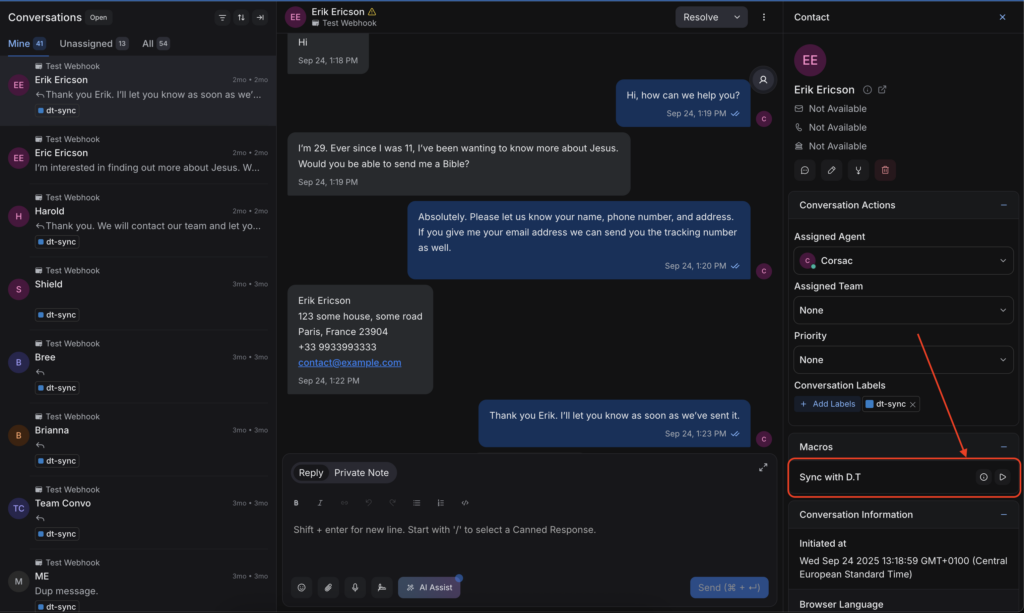
One-click sync to Disciple.Tools Click “Sync with D.T” and the contact plus full conversation history transfers automatically.
Optional AI features We’re also testing AI-powered features that can be turned on or off: contact extraction, conversation summaries, hostile message filtering, and AI-assisted responses.
How It Works
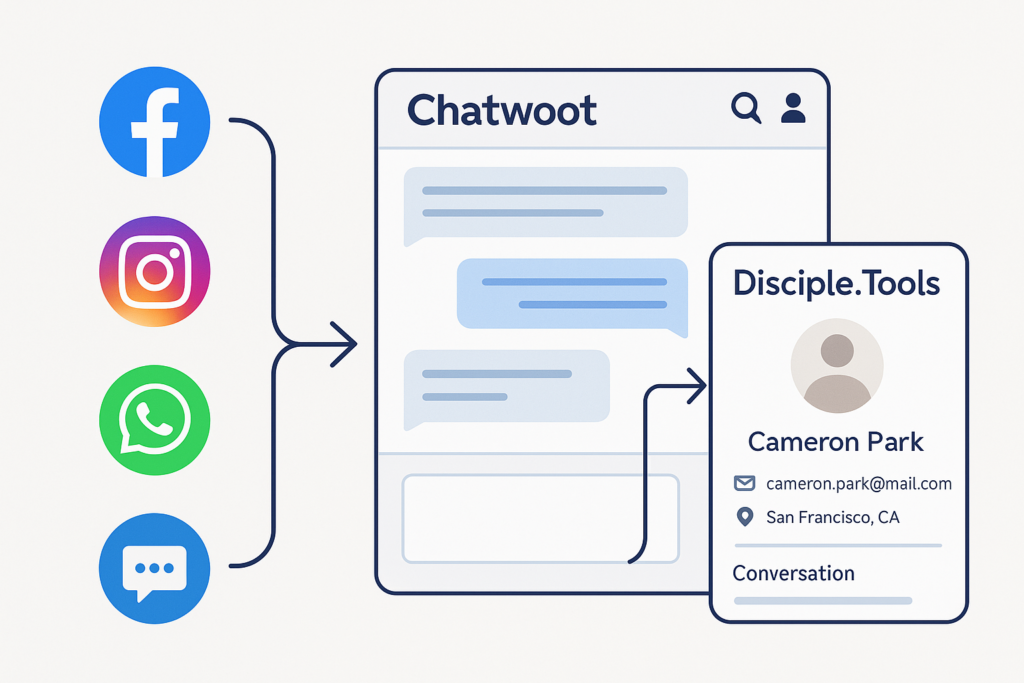
- Connect your Facebook pages, Instagram, WhatsApp, and web chat to Chatwoot
- Respond to seekers in the Chatwoot dashboard
- Sync with one click — contact and conversation transfer to D.T
- Follow up offline with full conversation context in Disciple.Tools
What It Looks Like
Chatwoot Dashboard
Where digital responders work. All incoming messages in one place. Apply labels, use canned responses, click to sync.
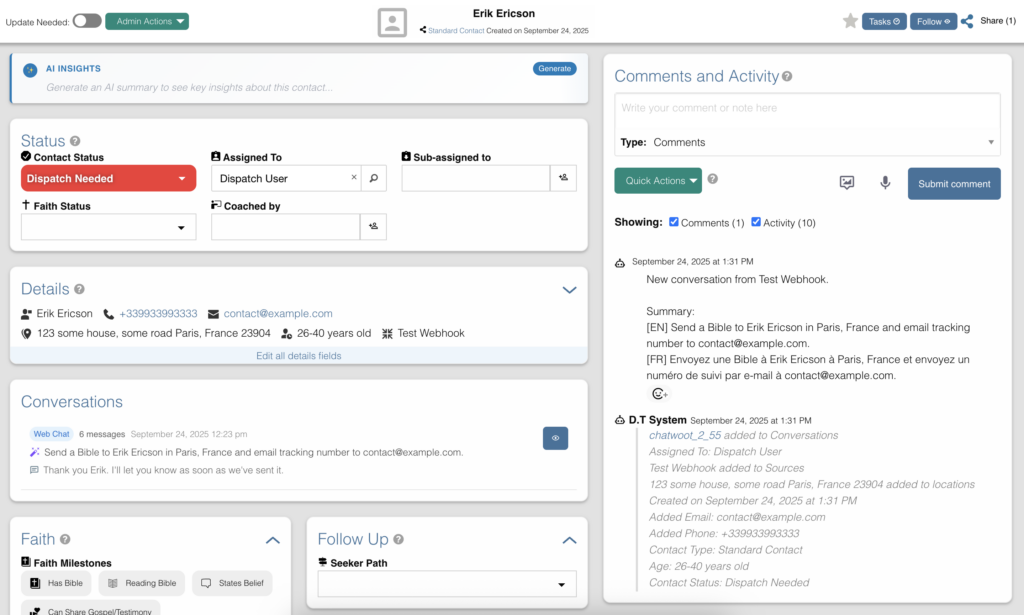
Disciple.Tools Contact
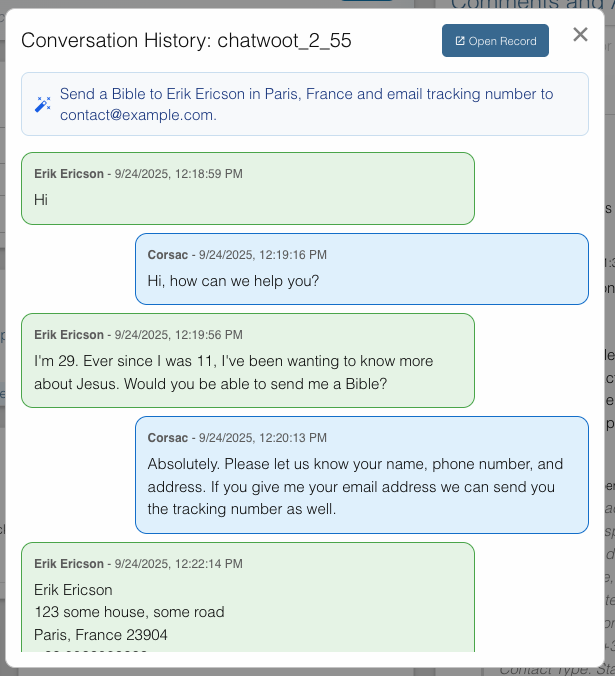
Where field workers manage follow-up. Synced contacts include full conversation history.
Before & After
| Before | After |
|---|---|
| Check Facebook, Instagram, WhatsApp, email separately | All conversations in one dashboard |
| Manually copy contact info to D.T | One-click sync |
| Field workers don’t know conversation context | Full conversation history in D.T |
| Every team sets up their own Facebook developer app | No technical setup required |
| Messages fall through the cracks | Unified inbox with conversation management |
Benefits by Role
Digital Responders — All conversations in one place. One click to hand off.
Field Workers — Full conversation context before reaching out.
Team Leaders — Visibility across all channels. Consistent workflow.
Common Questions
Do we need to change how we use Disciple.Tools? No. Synced contacts appear like any other contact.
What if we already have a Facebook integration with D.T? This approach replaces the direct Facebook-D.T integration. No more maintaining a Facebook developer app.
What channels are supported? Facebook Messenger, Instagram DMs, WhatsApp Business, website live chat, email, and more.
Is the AI required? No. The core value — unified inbox and one-click sync — works without AI. AI features are optional and still evolving.
Is this ready for production use? We’re in beta. The integration is working, but still evolving. We’re looking for teams who are okay with some rough edges and willing to give feedback.
What does it cost? Chatwoot is open-source. We’re exploring hosting options for the D.T community.
Join the Conversation
Interested in trying Chatwoot with your team? We’re looking for beta testers.
Head to the #chatwoot channel to:
- Ask questions about the integration
- Share your use case
- Get help getting set up
- Give feedback on what’s working and what’s not
This is early-stage — you’ll have direct access to the team building it.
Learn More
Chatwoot integration is a beta project from Disciple.Tools. We’re exploring how to better serve ministry teams doing online outreach.